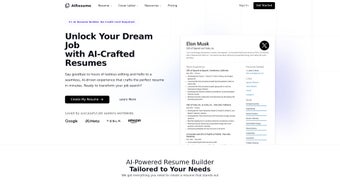

Download AiResume – AI‑Powered Resume Builder, Free & Secure
Overview
AiResume is a modern, AI‑driven web application that transforms the often‑tedious task of resume writing into a fast, intuitive experience. Launched on October 4, 2023, the platform leverages advanced natural‑language processing to analyze a user’s input—skills, work history, education, and achievements—and instantly generate a polished, recruiter‑friendly document. The service is designed for job seekers at every career stage, from fresh graduates to seasoned professionals, and it focuses on delivering a resume that not only looks great but also passes applicant‑tracking systems (ATS).
By automating formatting, keyword optimization, and content structuring, AiResume minimizes the hours typically spent tweaking layouts and re‑reading bullet points. The free tier provides full access to core functionalities, allowing users to test the AI engine without any financial commitment. For those who need extra customization, premium templates and export options are available via a modest subscription.
Because the application runs entirely in the browser, there is no need to download bulky software; all data is processed securely in the cloud, and the platform complies with GDPR and other privacy standards. Whether you’re transitioning careers, applying for a highly competitive role, or simply want a fresh look for your CV, AiResume promises a streamlined, data‑backed solution that boosts your chances of landing interviews.
Key Features, Pros & Cons
- AI‑generated content suggestions tailored to industry‑specific keywords.
- One‑click formatting with modern, ATS‑compatible templates.
- Real‑time grammar and style checking powered by GPT‑4 technology.
- Skill‑gap analysis that highlights missing competencies for target roles.
- Secure cloud storage with automatic backup and version history.
- Free version with unlimited resume drafts and basic export options.
- Premium upgrade offers PDF, DOCX, and LinkedIn profile export.
- Multilingual support for English, Spanish, French, and German.
- Integration with popular job boards for direct application submissions.
- Responsive design that works on desktop, tablet, and mobile browsers.
Pros
- Speed: Generates a complete resume in under three minutes.
- Accuracy: Uses AI to match keywords with the latest hiring trends.
- User‑friendly: No design skills required; the interface is drag‑and‑drop.
- Free tier: Provides essential features without hidden fees.
- Secure: End‑to‑end encryption protects personal data.
Cons
- Limited template variety in the free version.
- Advanced analytics (e.g., interview‑rate prediction) are locked behind premium.
- Requires a stable internet connection; offline editing is not available.
- Export options are restricted to PDF in the free tier.
- Occasional AI suggestions may need manual tweaking for niche industries.
Installation, Usage & Compatibility
Because AiResume is a web‑based service, there is no traditional installation process. Users simply need a modern browser (Chrome, Edge, Firefox, Safari) and an internet connection. Follow these steps to start building your resume:
- Visit the website: Navigate to aireresume.com and click “Get Started”.
- Create an account: Sign up with an email address or use Google/Facebook OAuth for instant access.
- Enter your data: Fill out the guided questionnaire—personal details, work experience, education, certifications, and skills. The AI will prompt you for optional achievements to enrich each section.
- Select a template: Browse the free template library; each design is optimized for ATS parsing.
- Generate & edit: Click “Generate Resume”. The AI produces a draft you can refine with in‑line editing tools, spell‑check, and style suggestions.
- Export: Choose PDF (free) or DOCX/LinkedIn (premium) and download the file to your device.
The platform’s responsive layout ensures a smooth experience across devices. On desktop, users benefit from a full‑screen editing canvas, while tablet and mobile users enjoy a touch‑optimized interface that retains all core functionalities. Because all processing occurs in the cloud, performance is largely dependent on network speed rather than local hardware.
Supported Operating Systems: AiResume works on Windows 10/11, macOS 12+, Linux distributions (via any Chromium‑based browser), Android 8+ and iOS 13+. The only requirement is a browser that supports HTML5 and JavaScript ES6.
Security is a top priority. All data transmission is encrypted with TLS 1.3, and user credentials are hashed using bcrypt. The platform adheres to GDPR, giving European users full control over data deletion and export. Regular updates to the AI model are pushed automatically, ensuring that keyword suggestions stay aligned with the latest hiring trends without any user intervention.
Frequently Asked Questions
Is AiResume truly free or are there hidden costs?
AiResume offers a completely free tier that includes unlimited resume drafts, AI suggestions, and PDF export. No credit card is required. Premium features—such as additional templates, DOCX export, and advanced analytics—are optional and billed monthly or annually.
Can I use AiResume on a mobile device?
Yes. The service is fully responsive and works on Android and iOS browsers. All core functionalities—including AI generation, editing, and PDF download—are available on smartphones and tablets.
How does AiResume ensure my data is secure?
All data is transmitted over TLS 1.3 encryption and stored in secure cloud servers with regular security audits. User passwords are hashed with bcrypt, and you can delete your account and all associated data at any time, complying with GDPR standards.
Will the AI suggestions match the keywords recruiters look for?
AiResume continuously crawls job postings and updates its keyword database. The AI tailors each resume to the specific role you select, inserting high‑impact keywords that improve ATS compatibility and catch recruiter attention.
Can I export my resume to LinkedIn?
LinkedIn export is a premium feature. With a paid subscription, you can push the generated content directly to your LinkedIn profile, ensuring consistency between your resume and online professional presence.
Conclusion & Call to Action
AiResume stands out in a crowded market of resume builders by combining cutting‑edge AI with a clean, no‑install web interface. The free version provides enough power for most job seekers to create an ATS‑friendly document in minutes, while the premium upgrade unlocks deeper customization and export flexibility. Security, speed, and cross‑platform compatibility make it a reliable ally for anyone serious about improving their job prospects. If you’re ready to replace hours of manual formatting with a few clicks, give AiResume a try today. Click the button below to start your free account, generate a polished resume, and take the first step toward landing your next interview.



.png)



